
All Fider Features
The All-in-One Tool for Creating and Publishing Social Media Content
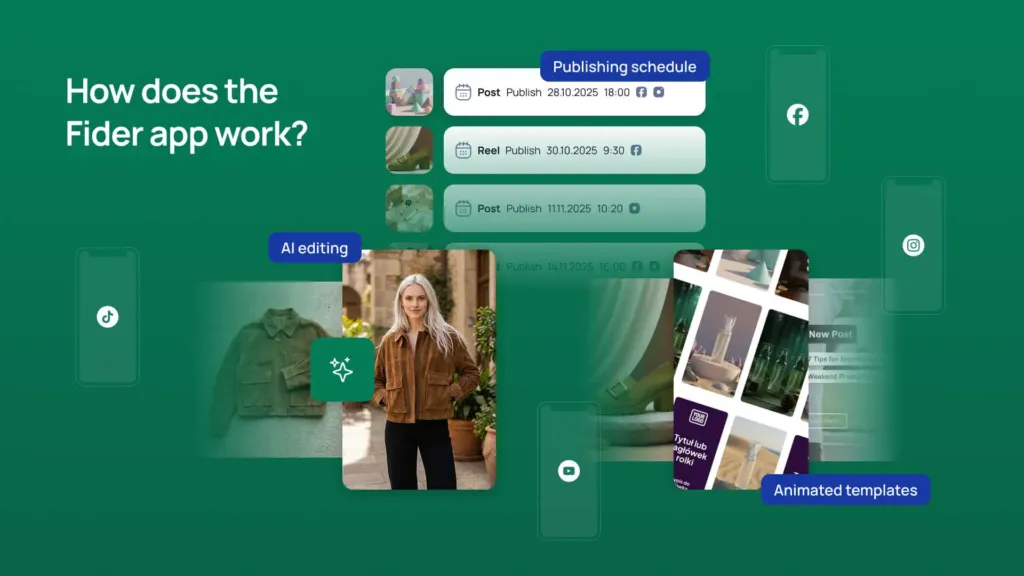
Fider brings together AI content and image generation, animated reels built from ready-made templates, and a publishing schedule for Facebook, Instagram, TikTok, YouTube, LinkedIn, and Google Business – all in one place. Give the AI a topic and it writes the copy and hashtags, generates the image, and you set the date and time to publish.
AI Post Content Generation
Fider’s AI assistant generates post copy and hashtags from a short topic description. It draws on your brand settings – tone of voice, writing style, and target audience – so every generated text stays consistent with your brand. Text generation is free and uses no credits.
Copy and Hashtags from a Single Prompt
You provide the topic, the AI delivers ready-to-use post copy and matching hashtags. No writing from scratch, no manual hashtag research.
On-Brand Every Time
The AI uses your brand settings: tone of voice, writing style, communication goal, and target audience. Set them once – the AI applies them every time.
Full Control Over Your Content
Generated text is a starting point. Edit, expand, and adjust it however you like before publishing.
Text Generation Is Free
Generate text content – posts, descriptions, hashtags – without any limit. Credits are only used for images and video.
AI Image Generation and Editing
Generate a post image from a text description, or edit an existing photo by describing the changes you want. You can also upload your own images from your device or pick from the media library. Add up to 10 images to a single post to create a gallery.
Image from a Description
Describe what you want to see and the AI generates an image matched to your post topic. No external design tools, no stock photo hunting.
AI Photo Editing
Upload a photo and describe the edits – e.g. “change the background to white” or “add text at the top.” The AI edits the image without Photoshop.
Your Own Photos or Media Library
Upload files from your device or choose from saved media. You don’t have to use AI if you already have ready-made images.
Galleries with Up to 10 Images
Add up to 10 images to a single post to create a gallery or carousel. More content in a single publish.
AI Video Generation
Turn a still photo into a short video clip (~6 seconds) using AI. Drop a photo into a reel slot, click “Animate,” and describe the motion in a prompt. The generated video replaces the photo in the reel template – no video editing, no external tools.
One Click and a Prompt
Once you add a photo to a reel slot, the “Animate” button appears. Enter a short description of the motion and the AI generates a video in moments.
Dynamic Clips Inside Reels
The generated clip (~6 s) slots directly into the reel template, replacing the still image. Your reels gain motion and energy.
No Additional Tools Needed
You don’t need After Effects, CapCut, or any other video editor. The entire process happens inside Fider.
Animated Reels from Ready-Made Templates
Create animated reels for Instagram, TikTok, and YouTube without a video editor. Pick a ready-made template that defines the scenes, animations, and layout. Fill in the text and photos – manually or with AI – and Fider generates the animated video. Publish the finished reel to your chosen platforms or download it as a video file.
Ready-Made Templates with Animations
Each template defines the number of scenes, animations, layout, and text fields. Pick a template and fill in the content – no designing from scratch.
AI Writes the Text for Each Scene
The AI assistant generates text for each reel scene, plus the caption and hashtags. Give it a topic and it fills the template.
Matched to Your Brand
Edit the template’s colors and visual elements to match your brand identity.
Download the Reel as a Video File
Download the finished reel as a video file independently of publishing. Send it to a client, share it on stories, or distribute it to partners.
Custom Templates on Request
Need a unique look? Order a custom template with your own branding, animations, music, and logo.
Post Scheduling Across 6 Platforms
Schedule posts and reels in advance – set the date, time, and choose the social media profiles. Fider publishes automatically at the scheduled time. A single post or reel can go out to multiple platforms at once: Facebook, Instagram, TikTok, YouTube, LinkedIn, and Google Business.
Plan Ahead
Prepare a full week of content in a single session. Set the date and time for each post and reel – Fider handles the rest automatically.
One Post, Multiple Platforms
Create a post or reel once and publish it to your chosen platforms simultaneously. No duplicate work.
Schedule View
All scheduled and published posts in one view. See statuses, dates, and platforms – full control over your content calendar.
Default Publishing Time
Set your preferred time once and Fider will suggest it for every new post. Fewer clicks when scheduling.
Brand Settings and AI Assistant Configuration
Configure the AI assistant once and every piece of generated content will be consistent with your brand. Set the tone of voice, writing style, communication goal, and target audience. Add your company details, logo, and reference posts for the AI to learn from.
Tone, Style, and Communication Goal
Define how the AI should write: formal or casual, informational or sales-focused. Set it once – the AI applies it every time.
Company Details and Logo
Enter your company name and description, and upload your logo in 4 variants. The AI uses this information when generating content.
Reference Posts as Style Examples
Add posts or descriptions that capture your voice. The AI learns from real examples – generated content sounds like you, not a robot.
How Does Fider Differ from Other Tools?
Fider combines content creation, image generation, and animated reels with post scheduling – all in one tool.
| Feature | Best choiceFiderAll-in-one | Buffer / HootsuiteScheduling | CanvaDesign | CapCutVideo |
|---|---|---|---|---|
| AI content generation | Yes | No | No | No |
| AI image generation | Yes | No | Separate tool | No |
| Animated reels from templates | Yes | No | Limited | Manual editing |
| AI video generation | Yes | No | No | No |
| Post scheduling | Yes | Yes | No | No |
| Publishing to 6 platforms | Yes | Yes | No | No |
| Brand settings for AI | Yes | No | No | No |
| Everything in one tool | Yes | No | No | No |
Buffer and Hootsuite handle scheduling, but don’t help you create content. Canva and CapCut help you create images and video, but don’t schedule or publish. Fider does both.
Frequently Asked Questions About Fider’s Features
Is AI content generation free?
Generating text content – post copy, reel descriptions, hashtags – is free and does not use any credits.
Can I create animated reels without any design skills?
Yes. Reels are built from ready-made templates – pick a template and fill in the text and photos.
Can I download a finished reel as a video file?
You can download a finished reel as a video file regardless of whether you publish it.
How does AI video generation work?
Add a photo to a reel slot, click “Animate,” and describe the motion. The AI generates a ~6-second clip that replaces the still image.
Does Fider publish content automatically without my approval?
Fider publishes automatically at the scheduled date and time, but every post must be saved manually by the user beforehand.
Can I order a custom reel template?
Yes – we offer custom reel templates built with your own animations, music, and logo.
What does the AI base its content on?
The AI uses the topic description, your company details, and the assistant settings – tone of voice, writing style, communication goal, and target audience.
Which social media platforms does Fider support?
Facebook, Instagram, TikTok, YouTube, LinkedIn, and Google Business – availability depends on your plan.
Start Creating Content Faster
Sign up for free and test the AI content generator – no credit card required.
- Try with no commitment
- Automate your content creation
- Cancel anytime