For Creators
More Content in Less Time – Without Juggling Apps
Tired of the content treadmill? Fider combines AI content generation, animated reels from templates, and publishing to Facebook, Instagram, TikTok, YouTube, LinkedIn, and Google Business – all in one place. One app instead of Canva, CapCut, Buffer, and a notes app full of hashtags.
AI Writes the Content and Hashtags – You Add Your Voice
Give it a topic and the AI writes your post and picks the hashtags. It doesn’t replace your creativity – it gives you a starting point you shape and make your own. No more staring at a blank screen.
No More Creative Block
Give it a topic (e.g. “behind the scenes of recording a podcast”) and the AI generates a draft. Edit it, add your style – publish.
Hashtags Matched to Your Content
The AI analyzes your topic and suggests hashtags. No manual searching, no copy-pasting from hashtag generators.
Your Tone, Not a Robot’s
The AI learns from your brand settings: your style, tone of voice, and goals. The content it generates sounds like you – not like a corporate chatbot.
Free, No Limits
Text and hashtag generation doesn’t use credits. Generate as much as you want.
Animated Reels from Templates – No CapCut, No Hours of Editing
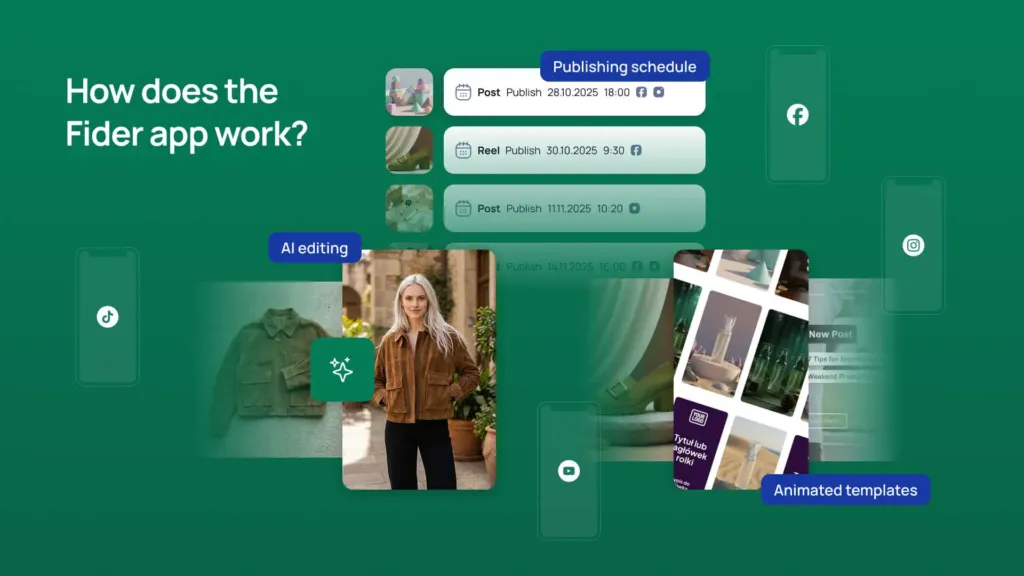
Pick a template, drop in your photos, fill in the text – Fider generates an animated video ready for Instagram, TikTok, and YouTube. Instead of spending an hour editing, you have your reel in minutes.
Templates Instead of a Timeline
Every template comes with pre-built scenes, animations, and transitions. You fill in your content and photos – you don’t design from scratch.
AI Writes the Text for Each Scene
Give the AI your reel topic and it fills the scenes with text, writes the description, and generates hashtags. You review and publish.
Turn a Photo Into a Video With AI
Drop a photo into a reel slot and click “Animate”. The AI generates a short clip (~6 s) – dynamic video instead of a static image.
Download and Use Anywhere
Download the finished reel as a video file. Post it to stories, share it with a sponsor, or use it anywhere you need.
Post Images Without Canva or Stock Photos
Describe what you want to see and the AI generates an image to match. You can also edit existing photos just by describing the changes. No extra subscriptions, no trawling through stock photo sites.
Image from a Prompt
“Lo-fi sunset over the city” – the AI generates an image ready for your post. No searching, no licensing hassles.
AI Photo Editing
Upload a photo and write “change the background” or “add text”. The AI edits it – no separate app needed.
Galleries Up to 10 Photos
Carousels, collections, behind-the-scenes – add up to 10 photos to a single post.
One Post, Five Platforms – Publish Once, Reach Everyone
Create your content once and publish to Facebook, Instagram, TikTok, YouTube, LinkedIn, and Google Business at the same time. No more manually copying and adjusting posts for each platform.
Pick Your Platforms, Set the Date
Select your profiles, set the date and time – Fider publishes automatically to all selected channels.
Plan Your Whole Week in One Session
Prep a full week of content on Monday. Set the schedule – the rest happens on its own.
Content Calendar
All your scheduled posts and reels in one view. See what, when, and where – no Google Sheets spreadsheet needed.
Frequently Asked Questions
Will Fider replace my current tools (Canva, CapCut, Buffer)?
For the most part, yes. Fider combines content generation, AI image creation, animated reels, and publishing schedule in one place. If you need advanced video editing, CapCut still makes sense – but for typical social media reels, Fider’s templates are more than enough.
Do the animated reels look professional?
Yes. Templates are designed by our team and define the animations, transitions, and layout. The result is a professional 9:16 video ready for Instagram, TikTok, and YouTube – you customize the colors, text, and photos.
Can I publish to all platforms at once?
Yes – when scheduling a post or reel, you select the social profiles you want. It publishes to all selected platforms at the same time. Platform availability depends on your plan.
How much does AI content generation cost?
Text and hashtag generation is free on all plans – it doesn’t use credits. Credits are used for AI images, video animations, and reel downloads.
Can I download a reel as a video file?
Yes – download the finished reel as an MP4 independently of publishing. Share it with a sponsor, post it to stories, or use it in a presentation.
Which plan should I choose as a creator?
If you mostly create posts with images, choose the Hobby plan. If you want to publish to YouTube and LinkedIn, choose Pro. If you need TikTok or Google Business, choose Ultimate.
Does the AI generate content in my style?
Yes – in your brand settings you set your tone of voice, writing style, communication goal, and reference posts. The AI learns from this and generates content that sounds like you.
Create More Content – Without Burning Out
Sign up for free and see how fast you can create a post with AI – no credit card required.
- Free to start, no credit card
- Unlimited AI content generation
- Cancel anytime